
Download CarConceptsAI – AI‑Powered Car Wrap Designer, Free & Secure Tool
Why CarConceptsAI Is the Next Big Thing in Vehicle Styling
In a market where vehicle customization has traditionally required expensive design studios, specialized graphic software, and countless hours of manual work, CarConceptsAI arrives as a game‑changing solution. Powered by state‑of‑the‑art deep‑learning models, this web‑based application lets anyone—from hobbyist car lovers to professional wrap installers—generate high‑quality, AI‑driven wrap concepts in a matter of seconds. The platform emphasizes three core principles: speed, security, and accessibility.
Speed comes from the cloud‑based processing engine that can render multiple design variations instantly, eliminating the need for lengthy design cycles. Security is built into every step; all uploads are encrypted, processed in a temporary sandbox, and automatically deleted after a short retention period, giving users confidence that their proprietary images and brand assets remain private. Accessibility is achieved through a fully browser‑based interface that works on Windows, macOS, Android, and iOS without any additional downloads or plugins.
Whether you are preparing a marketing mockup for a dealership, testing a new brand color scheme, or simply having fun visualizing a personal project, CarConceptsAI provides a frictionless experience that democratizes high‑end vehicle graphics. The free tier offers enough capability to explore the technology, while the premium subscription scales to meet the demands of commercial studios, offering unlimited renders, higher resolution exports, and priority processing. In short, CarConceptsAI bridges the gap between creative ambition and practical execution, making AI‑assisted car wrap design both affordable and reliable for every user.
Overview of CarConceptsAI and Its Standout Features
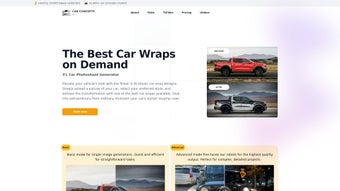
CarConceptsAI is a cutting‑edge, web‑based application that brings artificial intelligence to vehicle customization. By simply uploading a photo of your car, you can explore an unlimited library of AI‑generated wrap designs that match your personal taste, brand identity, or seasonal theme. The platform supports popular image formats such as JPEG, PNG, and WebP, and stores uploads securely in an encrypted cloud environment, ensuring that your personal data stays private while the AI processes the visual information.
Users can refine results with a prompt feature that lets you specify color palettes, motifs, or even specific graphics like flames, neon accents, or matte finishes. Whether you’re a professional designer looking for inspiration or a car enthusiast eager to preview a fresh look before committing to a physical wrap, CarConceptsAI delivers high‑resolution mockups within seconds. The tool’s intuitive interface eliminates the steep learning curve traditionally associated with graphic design software, making it accessible on Windows, macOS, Android, and iOS browsers.
While the free tier limits the number of daily renders, premium subscriptions unlock unlimited downloads, higher resolution outputs, and priority processing. Overall, CarConceptsAI offers a practical, affordable, and secure solution for anyone wanting to transform their vehicle’s aesthetic with AI‑driven creativity.
Key Feature List
- AI‑Generated Designs: Advanced deep‑learning models produce original wrap concepts based on your uploaded image and text prompts.
- Multi‑Format Support: Accepts JPEG, PNG, WebP, and SVG files, ensuring seamless uploads from phones, tablets, and cameras.
- Prompt‑Driven Customization: Users can dictate themes, color schemes, patterns, and branding elements through a simple natural‑language interface.
- High‑Resolution Export: Download mockups in 4K quality for print‑ready proofs or social‑media sharing.
- Secure Cloud Storage: All images are encrypted during transfer and stored temporarily; they are automatically deleted after processing.
- Cross‑Platform Accessibility: Works in modern browsers on Windows, macOS, Android, and iOS without additional software.
- Free Tier & Premium Options: Generate up to three designs per day for free; upgrade for unlimited renders, batch processing, and commercial licensing.
- Instant 3‑D Preview Mode: View the wrap on a 3‑D model of your exact car make and model, rotating to examine every angle.
- Collaboration Tools: Share a private link with teammates or clients for feedback and approval.
- Regular Updates: Monthly AI model enhancements keep the design library fresh and aligned with current trends.
Installation & Usage Guide – Getting Started in Minutes
Step‑by‑Step Setup
Because CarConceptsAI is a web‑based service, there is no traditional installation process. Follow these simple steps to start creating stunning car wraps:
- Create an Account: Visit carconceptsai.com and sign up using your email or social login. Verification is instant.
- Upload Your Vehicle Photo: Click “Upload Image,” select a high‑resolution photo of your car (ideally taken in daylight with a neutral background), and confirm the file format.
- Enter Your Design Prompt: In the text box, describe the style you want—e.g., “Matte black with electric blue neon stripes” or “Retro 80s pastel gradient.” The AI will interpret these cues.
- Select a Style Template (Optional): Choose from pre‑defined categories like “Sport,” “Luxury,” “Off‑Road,” or “Custom Graphic” to guide the AI.
- Generate & Review: Hit “Generate.” Within seconds, up to four design variations appear. Use the 3‑D viewer to rotate the model and inspect details.
- Refine Your Choice: If needed, tweak the prompt or adjust color sliders. The AI will re‑render the design while preserving previous work for comparison.
- Download the Final Mockup: Once satisfied, click “Download.” Free users receive a 1080p PNG; premium users receive a 4K PDF or SVG suitable for professional printing.
- Print & Apply: Provide the high‑resolution file to your preferred wrap installer, or use it as a digital mockup for marketing.
Tips for Optimal Results
• Use a straight‑on shot of the vehicle to minimize distortion.
• Keep the background uncluttered to help the AI focus on the car’s contours.
• Specify exact color codes (HEX or RGB) in the prompt for brand‑consistent palettes.
• Take advantage of the “Batch Render” feature in the premium plan to experiment with multiple concepts simultaneously.
• Review the AI’s suggestions critically; while impressive, some intricate details may need manual tweaking before production.
• If you encounter rendering delays, ensure a stable internet connection and consider clearing your browser cache to improve performance.
• For professional workflows, export the SVG version and fine‑tune vector paths in Adobe Illustrator or Inkscape for pixel‑perfect alignment.
• Leverage the collaboration link to gather stakeholder feedback in real time, reducing the number of revision cycles.
Compatibility, Pros & Cons, and Frequently Asked Questions
Supported Operating Systems
CarConceptsAI runs entirely in the browser, making it compatible with any modern operating system that supports HTML5 and JavaScript. This includes:
- Windows 10 and later (Edge, Chrome, Firefox)
- macOS Catalina and later (Safari, Chrome, Firefox)
- Android 9+ (Chrome, Firefox)
- iOS 13+ (Safari, Chrome)
No additional plugins or downloads are required, and the platform automatically adjusts its UI for desktop, tablet, or mobile screens, ensuring a consistent experience across devices.
Pros & Cons
- Pros:
- Instant AI‑generated designs save time and money.
- Secure cloud processing protects user privacy.
- High‑resolution outputs ready for professional printing.
- Cross‑platform accessibility—no installation needed.
- Free tier available for casual users.
- Collaboration links streamline feedback loops.
- Regular AI model updates keep designs fresh.
- Cons:
- Free version limits daily renders to three designs.
- AI may occasionally misinterpret complex prompts.
- Advanced editing (e.g., vector fine‑tuning) still requires external software.
- Internet connection required for all operations.
- Batch rendering is exclusive to premium subscribers.
FAQ – Your Questions Answered
How many free designs can I generate per day?
The free tier allows up to three AI‑generated wrap concepts per 24‑hour period. Upgrading to a premium plan removes this limitation.
Is my uploaded car photo stored permanently?
No. Images are encrypted during upload, processed, and automatically deleted from the server within 48 hours unless you choose to save them in your personal library.
Can I request a specific brand’s color palette?
Absolutely. Include the exact HEX or RGB codes in your prompt, and the AI will incorporate those colors into the generated wrap.
Do I need any design software to edit the final mockup?
The downloaded files are ready for printing, but if you want to make minor tweaks (e.g., adjust logo placement), you can open them in any vector or raster editor such as Adobe Illustrator or Photoshop.
What payment methods are accepted for the premium subscription?
We accept major credit cards (Visa, MasterCard, American Express), PayPal, and Apple/Google Pay for recurring monthly or annual plans.
Overall Rating: 4.5/5 – CarConceptsAI delivers an impressive blend of AI creativity and user‑friendly workflow, making it a top choice for both hobbyists and professional wrap installers.
Conclusion & Call to Action
CarConceptsAI reshapes how vehicle owners and designers approach wrap creation. By harnessing powerful AI algorithms, it eliminates the guesswork and expense of manual mockups while maintaining a secure, cross‑platform experience. Whether you’re looking to preview a bold new aesthetic, streamline your design pipeline, or simply have fun experimenting with colors and graphics, this tool offers a fast, reliable, and affordable solution. The free tier provides enough capability to test the concept, and the premium plan scales gracefully for commercial studios needing unlimited renders and higher resolution assets.
Ready to give your car a fresh, eye‑catching look? Download CarConceptsAI now, create your first AI‑driven wrap, and see how effortlessly technology can elevate automotive style.



.png)



